
Command Palette
The ⌘K command palette is the central control surface of Flightdeck. It combines fuzzy search, natural language commands, AI-powered suggestions, and quick navigation into a single keyboard-driven interface.
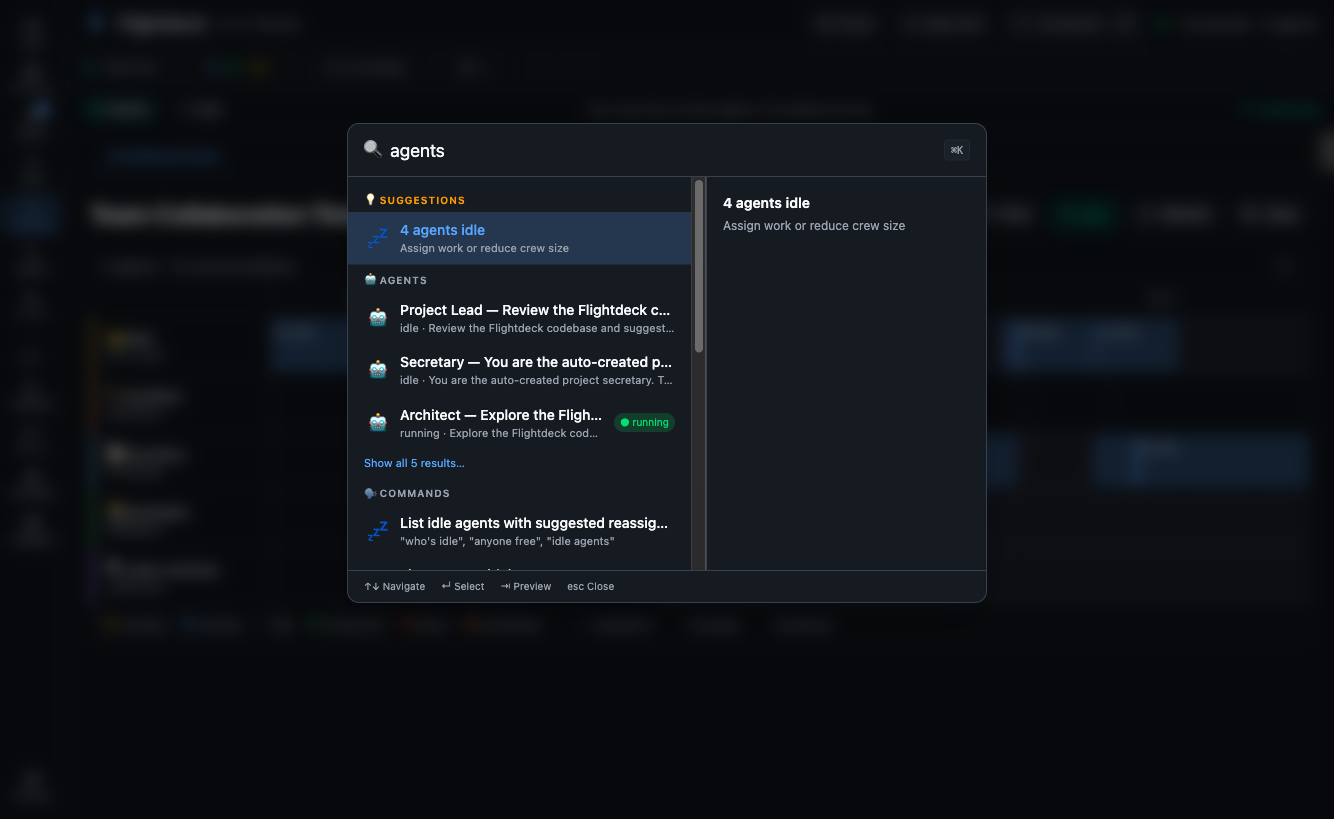
Opening the Palette
Press ⌘K (Mac) or Ctrl+K (Windows/Linux) from anywhere in the app. The palette opens as a centered modal overlay.
Fuzzy Search
Start typing to search across all entities:
- Agents — by name, role, or current task
- Tasks — by title or status
- Routes — navigate to any page
- Settings — jump to specific settings sections
- NL Commands — natural language crew control
Search is powered by Fuse.js with configurable thresholds for fuzzy matching. Results are grouped by category with icons.
Natural Language Commands
Type natural language directly into ⌘K to control your crew:
Control Commands (12)
| Command | Example |
|---|---|
| Pause agent | "pause the developer" |
| Pause all | "pause all agents" |
| Resume agent | "resume architect" |
| Resume all | "resume all" |
| Terminate agent | "stop the QA tester" |
| Restart agent | "restart developer" |
| Spawn agent | "spawn a new developer" |
| Set budget | "set budget to $5" |
| Approve all | "approve all pending" |
| Reject decision | "reject decision 3" |
| Scale up/down | "add 2 more developers" |
| Emergency stop | "stop everything" |
Query Commands (9)
| Command | Example |
|---|---|
| Status check | "what's the status?" |
| Show agent | "show me the architect" |
| List tasks | "what tasks are running?" |
| Show context | "which agents are running low on context?" |
| Count agents | "how many agents are active?" |
| Show errors | "any errors?" |
| Show conflicts | "are there any conflicts?" |
| Show timeline | "show recent activity" |
Navigate Commands (4)
| Command | Example |
|---|---|
| Go to page | "go to settings" |
| Open agent | "focus on developer" |
| Open dashboard | "go home" |
| Open timeline | "show timeline" |
Create Commands (1)
| Command | Example |
|---|---|
| New session | "start a new session" |
TIP
Commands use pattern matching — no LLM needed. You don't need to type the exact phrase; the system matches intent from natural variations.
Destructive Command Preview
Commands that modify state (pause, terminate, approve all) show a preview panel before executing:
- What will happen
- Which agents/tasks are affected
- A confirm/cancel button pair
Undo Stack
After executing a command, you can undo it within 5 minutes. The undo button appears in the palette's status bar.
AI Suggestions
When the palette is open, an AI suggestion engine (rule-based, no LLM) surfaces context-aware actions:
- "3 pending approvals" → suggests "Review approvals"
- Agent approaching context limit → suggests "Restart agent"
- No active session → suggests "Start a session"
- Recent repeated action → suggests the command
Suggestions appear below the search input as quick-action chips.
Recent Commands
When the search input is empty, the palette shows your recently executed commands for quick re-use. History is stored in localStorage and limited to the 10 most recent.
Keyboard Navigation
| Key | Action |
|---|---|
↑ / ↓ | Navigate results |
Enter | Execute selected item |
Tab | Open preview panel |
Escape | Close palette |
⌘K | Toggle palette |